What is a Smart Whiteboard and How Does it Work?
Digital transformation has fundamentally changed how we share ideas in professional and educational settings. The traditional dry-erase board is quickly becoming a relic of the past. In its place, the smart whiteboard has emerged as a central hub for modern collaboration. This advanced tool combines the simplicity of writing with the power of high-speed computing.
By 2026, the global interactive display market is expected to reach nearly $19 billion. This growth highlights the increasing reliance on interactive technology for remote and hybrid work. Understanding the mechanics behind these devices is essential for any organization upgrading its infrastructure. A smart whiteboard is not just a screen; it is a sophisticated communication engine.
What is a Smart Whiteboard?
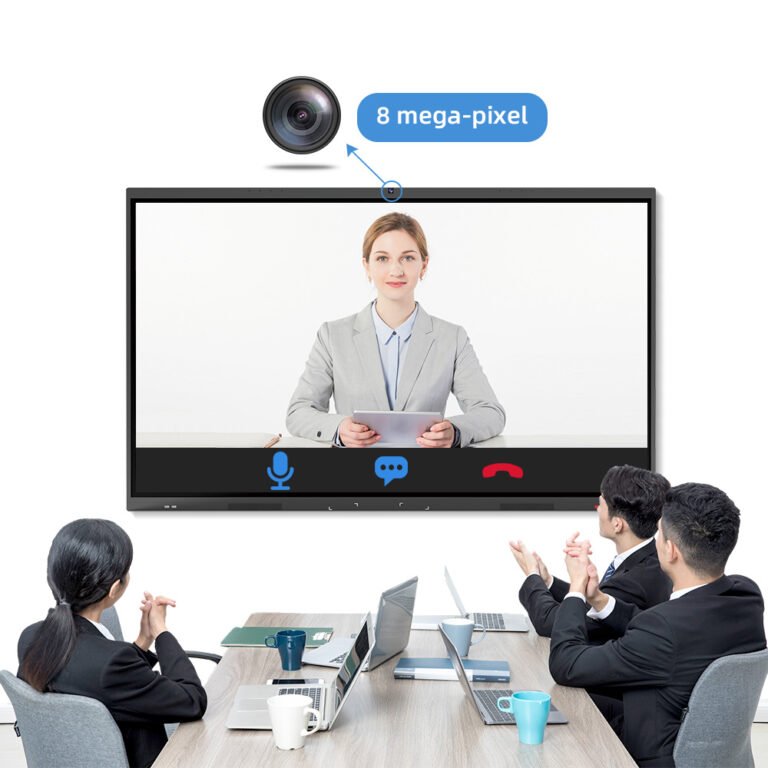
A smart whiteboard is a large-format interactive display that functions like a giant tablet. It integrates a high-definition screen, a touch-sensitive surface, and an internal operating system. Users can write, draw, and manipulate digital content directly on the surface using their fingers or a stylus. Unlike a standard TV, these devices are designed for two-way interaction rather than passive viewing.
Modern units typically offer 4K Ultra-High-Definition (UHD) resolution for crystal-clear visuals. This ensures that text remains legible even in large lecture halls or corporate boardrooms. Most models come equipped with built-in speakers, microphones, and cameras to support video conferencing. Consequently, the smart whiteboard serves as an all-in-one solution for presentation and communication.
The hardware often includes a variety of input ports like HDMI, USB-C, and DisplayPort. This allows the device to connect with external laptops, tablets, and mobile phones effortlessly. Additionally, many units feature dual operating systems, allowing users to switch between Android and Windows. This flexibility makes the smart whiteboard compatible with almost any professional software suite available today.
| Feature | Traditional Whiteboard | Smart Whiteboard |
| Surface Type | Physical Enamel/Melamine | 4K LED Touch Screen |
| Data Storage | None (Requires Photos) | Instant Cloud/Local Saving |
| Connectivity | None | WiFi, Bluetooth, LAN |
| Interaction | Manual Writing Only | Multi-touch, Gestures, Apps |
| Collaboration | Physical Presence Only | Remote Real-time Sharing |
How Does a Smart Whiteboard Work?
The core functionality of a smart whiteboard relies on advanced touch-sensing technologies. Most modern displays utilize Infrared (IR) touch or Projected Capacitive (P-Cap) touch systems. Infrared systems use an invisible grid of light beams across the screen surface. When a finger breaks these beams, the onboard processor calculates the exact coordinates of the touch.
Once the coordinates are identified, the internal controller translates them into digital commands. This process happens in less than 8 milliseconds in high-end models. This low latency ensures that digital “ink” appears to flow directly from the stylus tip. Therefore, the writing experience feels natural and mimics the sensation of traditional markers.
Connectivity plays a massive role in how these devices operate within a network. A smart whiteboard connects to the internet via high-speed Wi-Fi 6 or Ethernet cables. This allows the device to access cloud storage services like Google Drive or OneDrive. Users can pull up documents, edit them live, and save changes back to the cloud instantly.

Software is the final layer that makes the hardware useful for daily tasks. Specialized whiteboarding applications provide tools like infinite canvases, shape recognition, and digital Post-it notes. These apps often support multi-user interaction, allowing up to 40 touch points simultaneously. This means multiple team members can brainstorm on the same smart whiteboard at once.
Technical Specifications and Performance Data
When evaluating a smart whiteboard, technical performance metrics are critical for long-term satisfaction. High-quality panels now boast a brightness level of at least 350 to 450 nits. This ensures the display remains visible even in brightly lit rooms with significant ambient sunlight. Anti-glare coatings are also standard to prevent reflections from overhead office lights.
The processing power inside these displays has seen a 40% increase in efficiency since 2024. Most units in 2026 utilize octa-core processors coupled with at least 8GB of RAM. This hardware configuration allows for smooth multitasking between video calls and heavy document editing. Users rarely experience lag, even when running high-resolution 3D models or complex data visualizations.
Data security has also become a focal point for interactive display technology. Modern systems include biometric scanners or NFC card readers for secure user authentication. This prevents unauthorized access to sensitive corporate data stored on the internal drive. Furthermore, encrypted screen-sharing protocols ensure that wireless presentations remain private within the meeting room.
Selecting the Right Smart Whiteboard for Your Needs
Choosing the correct display depends heavily on your specific environment and usage frequency. You must consider the physical size of the room to determine the ideal screen diagonal. For small huddle rooms, a 55-inch or 65-inch model is usually sufficient for clear viewing. However, large conference rooms or classrooms often require 86-inch or 98-inch versions.
You should also look for a manufacturer that offers a comprehensive software ecosystem. Brands like SVDisplay provide a diverse range of smart whiteboard products tailored for different sectors. Their product line includes specialized options for both interactive education and corporate collaboration. Exploring their interactive flat panel categories can help you identify features like built-in cameras or modular PC slots.
Durability is another factor that justifies a higher initial investment in quality hardware. Premium screens feature 7H hardness tempered glass to resist scratches and accidental impacts. They are often rated for 50,000 hours of continuous use, ensuring many years of reliable service. When you select a smart whiteboard from a reputable provider, you gain access to consistent firmware updates. These updates improve security and add new features over the device’s lifecycle.
Summary
A smart whiteboard is a powerful interactive tool that blends high-definition display technology with intuitive touch controls. It works by using sensors to track movement and converting those inputs into digital actions via an internal computer. By 2026, these devices have become essential for efficient, high-speed collaboration in professional and academic environments.
PRO TIP
To maximize the lifespan of your smart whiteboard, always use a dedicated microfiber cloth for cleaning. Avoid using harsh chemical sprays that can damage the specialized anti-glare and anti-fingerprint coatings. Regularly updating the system firmware will also ensure you have the latest security patches and touch-calibration improvements.
FAQ
1. Can a smart whiteboard connect to my existing laptop?
Yes, a smart whiteboard connects to laptops through wired connections like HDMI and USB or wireless protocols. Most modern displays support AirPlay, Miracast, and Chromecast for seamless screen mirroring without extra cables. This allows you to share your screen and control your laptop directly from the whiteboard surface.
2. Do I need a special pen to write on the screen?
Most smart whiteboard models support both specialized styluses and simple finger touch. Passive styluses are common because they do not require batteries or complex pairing processes. Some advanced screens also feature pressure sensitivity, which requires an active digital pen for artistic or precision work.
3. Is an internet connection required for a smart whiteboard to function?
While a smart whiteboard can function offline for basic drawing and local presentations, an internet connection is recommended. Connectivity enables cloud saving, remote collaboration, and access to web-based applications. Without the internet, you lose the ability to perform live video updates or software-based remote troubleshooting.
4. How many people can use the whiteboard at the same time?
Most high-quality interactive displays support between 20 and 40 simultaneous touch points. This allows multiple users to write or move objects on the screen at once without interference. Such multi-touch capability is vital for group brainstorming sessions and interactive classroom activities in 2026.
5. What is the difference between an interactive whiteboard and a smart whiteboard?
Technically, an “interactive whiteboard” often refers to older systems requiring a projector and a separate computer. A smart whiteboard usually refers to an “all-in-one” interactive flat panel with its own built-in screen and processor. The latter offers better brightness, higher resolution, and a much simpler setup process for modern offices.
Reference Sources
FutureSource Consulting Global Interactive Display Market Report